
 Join our Discord
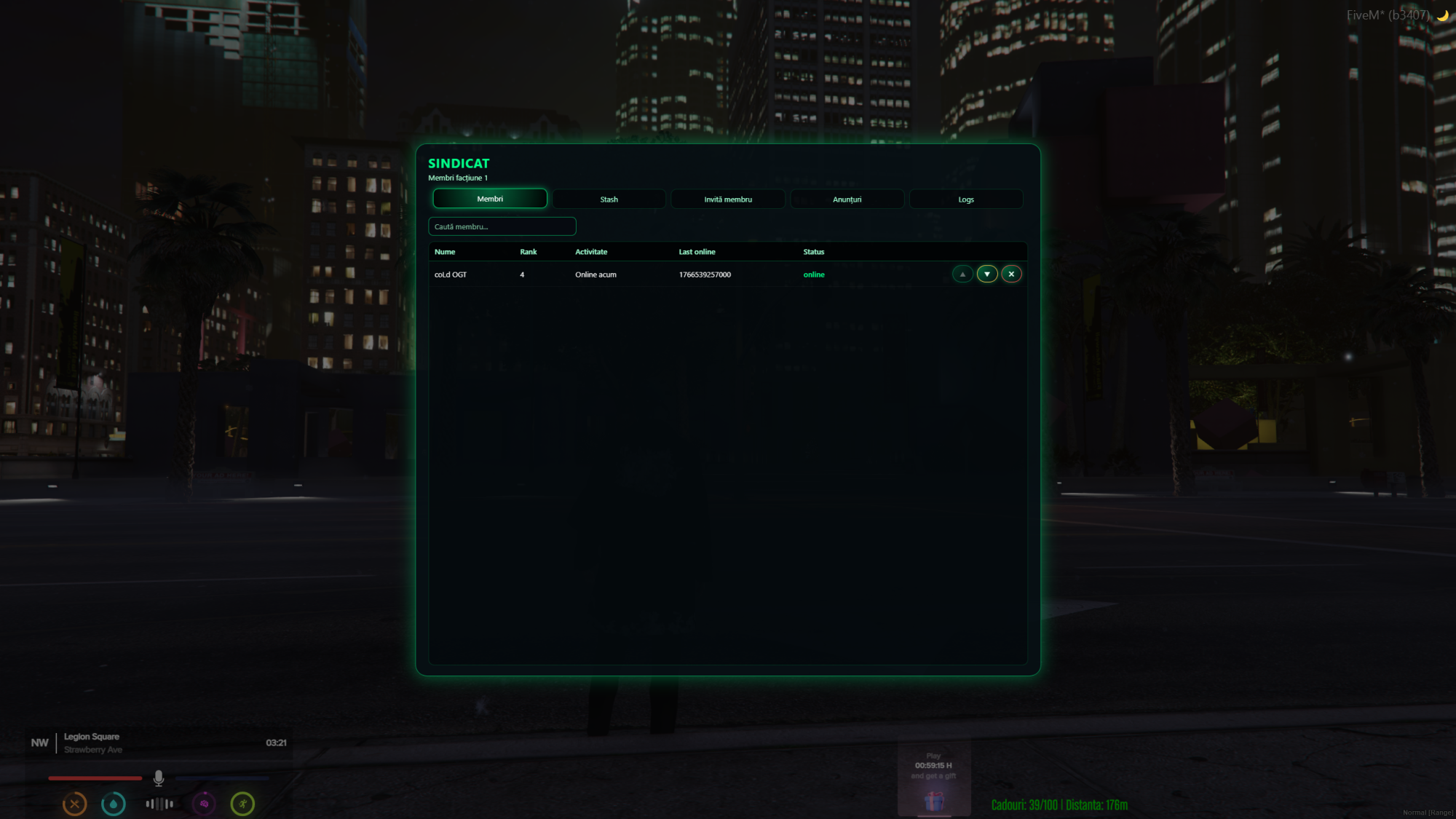
Manage your gangs like a real organization, not just a flag on the player.
This resource adds an advanced gang management system for QBCore, including an in‑game boss tablet, activity tracking, recruitment tools, CK command and shared gang stash support.
🔥 Main Features
-
In‑game gang boss tablet opened via
/gangmenu(boss only – minimum grade from config).** -
Full gang roster:
- Online members with name, grade and “Online now” status.
-
Offline members with last seen time stored in
gang_activity.
-
Announcements & logs per gang:
- Bosses can post internal announcements for their gang.
-
Every important action (recruit, rank change, kick, CK) is saved in
gang_logs.
-
Member management from the tablet:
- Recruit players into your gang.
-
Promote / demote members between ranks (using
Config.GangRoles). - Kick members out of the gang.
-
CK tool –
/cleangang [gang](admin only –god):- Removes all ONLINE players from a gang (CK whole organization).
- Writes detailed logs and sends a global RP message (chat by default, okokChat optional).
-
Gang stash support:
-
Each gang can have its own stash (slots, weight, label) defined in
Config.Gangs. -
Default handler is qb-inventory, but you can change the stash open logic in
config.lua.
-
Each gang can have its own stash (slots, weight, label) defined in
⚙️ Configuration
- ***
config.lua*fully open:- Pre-configured with multiple gangs (Lost MC, Ballas, Vagos, Cartel, Families, Bloods, Crips and many more – all editable).
- Per‑gang settings: label, bossLocation and stash configuration.
-
Rank system:
-
0– Member** -
1– Officer** -
2– Leader**
-
-
Minimum grades for:
- opening the boss tablet,
- managing members,
- accessing the gang stash.
- Notify handler (QBCore notify by default, can be replaced).
- Inventory handler (qb-inventory by default, can be replaced).
- Global CK broadcast handler (chat by default, okokChat or custom supported).
📦 Requirements
-
qb-core(QBCore framework).** -
oxmysql(MySQL resource withMySQL.*.await). -
qb-inventory(default inventory system).** -
Optional:
okokChat(for styled global CK messages).**
🗄️ Database
-
gang_activity– tracks member activity, gang and last_seen.** -
gang_announcements– gang-specific announcement board.** -
gang_logs– internal gang logs.** -
SQL file ***
sql/gangboss.sql*is included.
🔧 Installation
-
Place the resource in your
resourcesfolder (e.g.coldstudio-gangboss). -
Import ***
sql/gangboss.sql*into your database. -
Configure gangs, ranks and handlers in
config.lua. -
Ensure
qb-core,oxmysqland ***qb-inventory*are started before this resource. -
Add
ensure coldstudio-gangbossto your ***server.cfg*and restart.
🔒 Asset Escrow
- This resource uses CFX Asset Escrow for protection.
-
config.lua(and SQL / README) are fully open for configuration.** - Core logic (client, server, NUI) is protected to prevent leaks and ensure fair usage.
🛠️ Support
-
Support via Discord (ColdStudio).
https://discord.gg/aSc68qzPHj -
Please include errors, QBCore version and what you changed in ***
config.lua*when asking for help.