
 Join our Discord
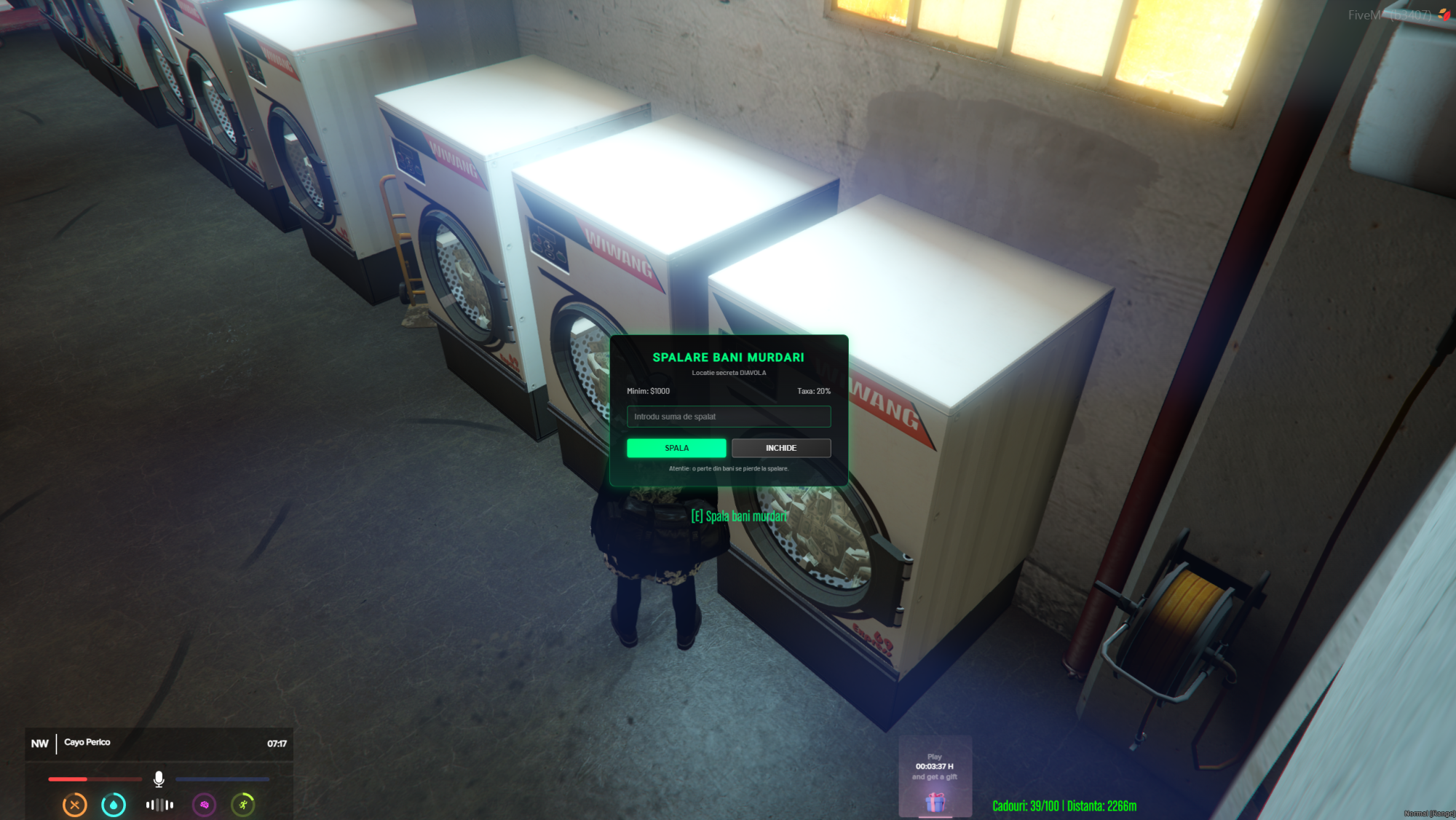
Turn a secret offshore laundry into a neon money wash for your QBCore server.
Players convert dirty money items into clean cash with a configurable fee, while server-side checks, cooldowns and optional Discord logs keep everything safe and transparent.
🔥 Main Features
-
QBCore money-as-item support
Usesmarkedbills(or any item you set) as dirty money and converts it into clean cash with a configurable percentage fee. -
Neon wash locations
Preconfigured row of washing machines in an offshore-style interior, with configurable locations, radius and neon green 3D interaction text. -
Clean NUI wash panel
Press E at a machine to open a custom UI where players enter the amount to wash and see minimum amount + fee before confirming. -
Server-side validation before emote
A QBCore callback checks if the player has enough dirty money and meets the minimum requirement before any animation or progressbar starts, sending an instant notification if not. -
Progressbar & animation
QBCore progressbar with configurable duration and animation; player is rotated toward the machine and movement/combat are disabled while washing. -
Cooldown, logging & Discord webhook
Optional per-player cooldown, console logging and an optional Discord webhook so you can track every wash (name, citizenid, dirty amount, clean payout).
⚙️ Configuration
Everything is handled from a single open config.lua:
-
Config.DirtyItem– dirty money item name (e.g.markedbills,dirtymoney). -
Config.MinAmount– minimum amount that can be washed. -
Config.FeePercent– fee percentage taken on each wash. -
Config.WashLocations– vector3 positions of each washing machine. -
Config.WashRadius,Config.KeyWash,Config.HelpText– interaction radius, key (E) and 3D text label. -
Config.ProgressTime,Config.Anim,Config.Progressbar.label– wash duration, animation and progressbar text. -
Config.Cooldown– per-player cooldown between washes. -
Config.EnableLogging,Config.LogToConsole,Config.Webhook– enable/disable logs and optional Discord webhook URL. -
Config.NotifyType+Config.Messages– notification system and all messages in one place for easy translation/branding.
🔒 Asset Escrow
This resource is delivered as a CFX Asset Escrow script.
Open (editable) files:
-
config.lua - All UI files (
html/index.html,html/style.css,html/script.js)
Client and server logic are protected to prevent leaks, while configuration and UI remain fully accessible to server owners.
📦 Requirements
-
qb-core(QBCore framework) -
qb-inventoryor compatible inventory supporting money-as-item -
qb-progressbar(or a compatible progressbar replacement)
🔧 Installation
- Drop the
og-moneywashfolder into yourresourcesdirectory. - Add to your
server.cfg:
ensure og-moneywash - Make sure the dirty money item from
Config.DirtyItem(defaultmarkedbills) exists inqb-core/shared/items.lua. - Configure
config.lua(dirty item, fee, minimum amount, locations, cooldown, logging and Discord webhook).
🛠️ Support
Support via Discord: https://discord.gg/aSc68qzPHj
When opening a ticket, please include:
- Your FiveM build and QBCore version
- Any server/client console errors
- Your
config.luachanges (or screenshots)