
 Join our Discord
🚗 coLdStudio Advanced Vehicle Showroom – QBCore
A premium, modern and highly configurable vehicle dealership experience for FiveM roleplay servers.
Transform the way players browse, customize, test drive and purchase vehicles with coLdStudio Advanced Vehicle Showroom.
Featuring a polished interactive interface, real-time 3D vehicle previews, configurable dealerships, vehicle customization and a complete installment-based financing system, coLdStudio Showroom provides a streamlined vehicle purchasing experience.
Built for QBCore, with configurable dealership locations, optional NPC dealers, map markers, automatic vehicle category detection, server-side transaction validation and full source-code access.
🔥 Main Features
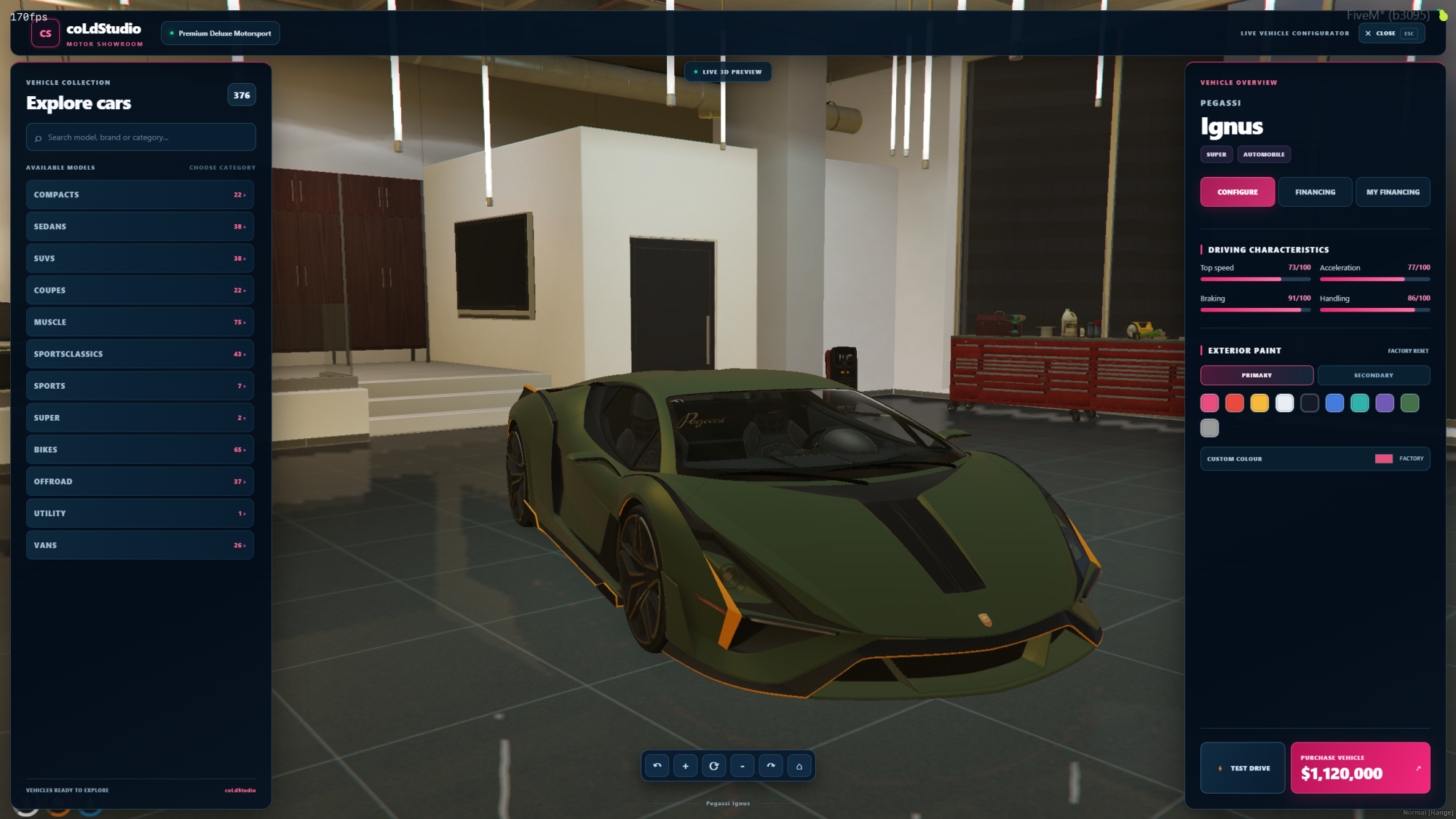
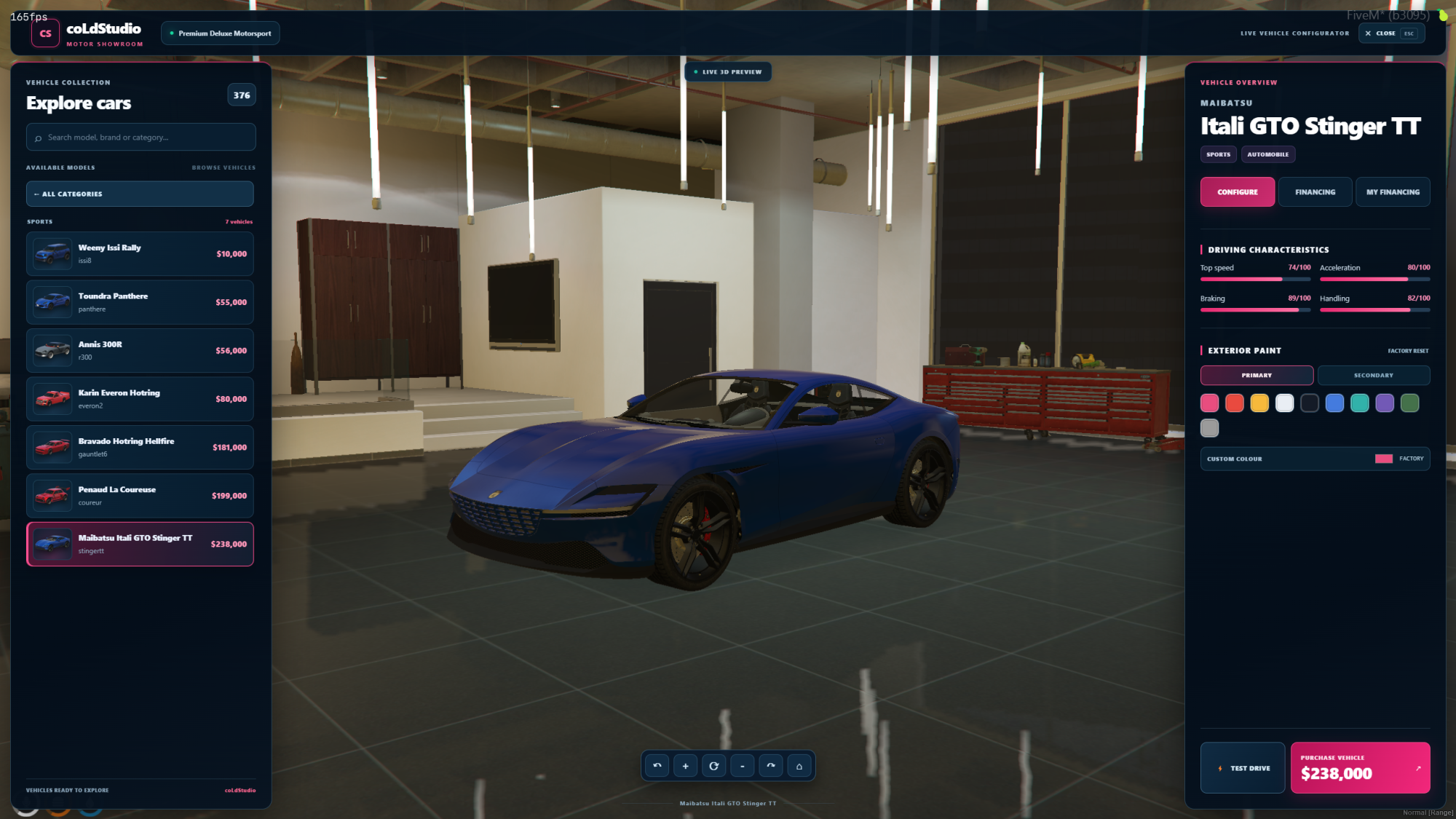
🚗 Modern Vehicle Showroom UI – Clean, dark-themed interface with interactive vehicle browsing and configuration.
🎥 Real-Time 3D Vehicle Preview – View actual vehicle models in the game world before purchasing.
🔄 Interactive Vehicle Rotation – Rotate vehicles manually or enable automatic rotation.
🔍 Vehicle Camera Controls – Adjustable camera zoom and viewing controls.
🎨 Vehicle Paint Customization – Preview primary and secondary vehicle colours, including custom HEX colours when enabled.
📊 Vehicle Performance Display – View speed, acceleration, braking and handling characteristics.
🚘 Vehicle Test Drives – Allow customers to test vehicles before committing to a purchase.
💰 Direct Vehicle Purchasing – Buy vehicles using the configured QBCore payment account.
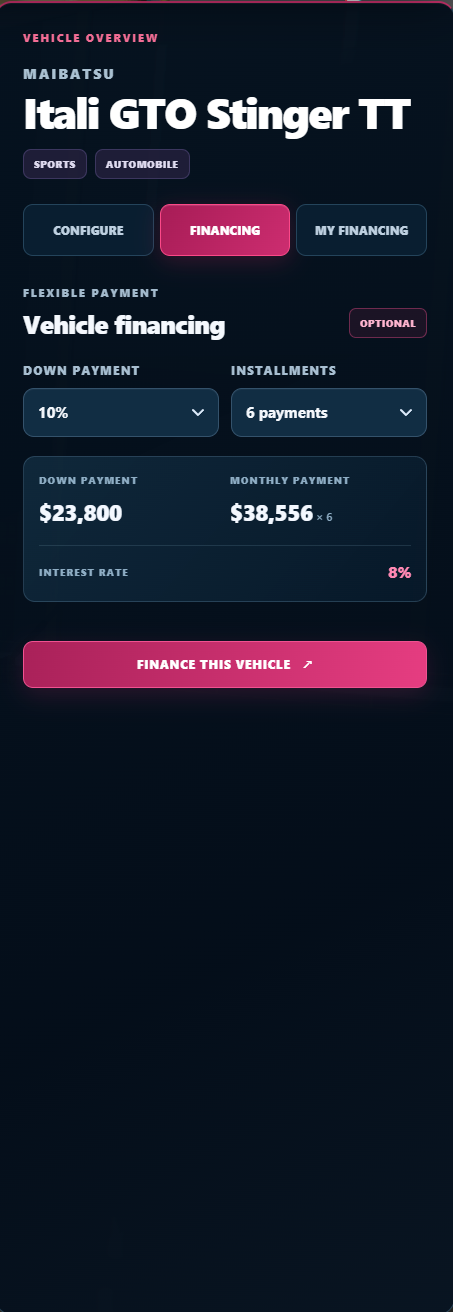
🏦 Integrated Vehicle Financing – Purchase vehicles using configurable down payments, installment terms and interest rates.
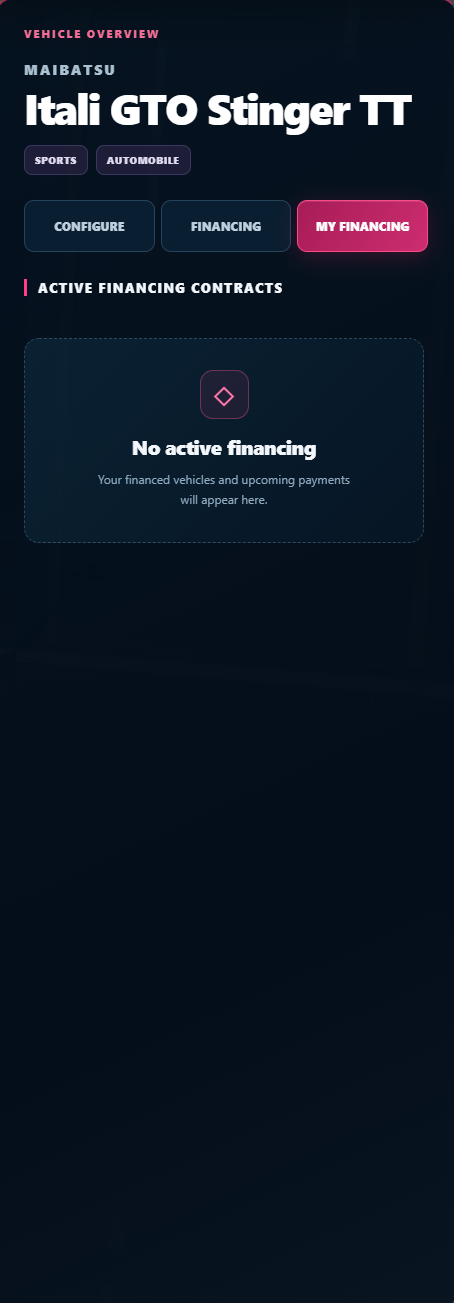
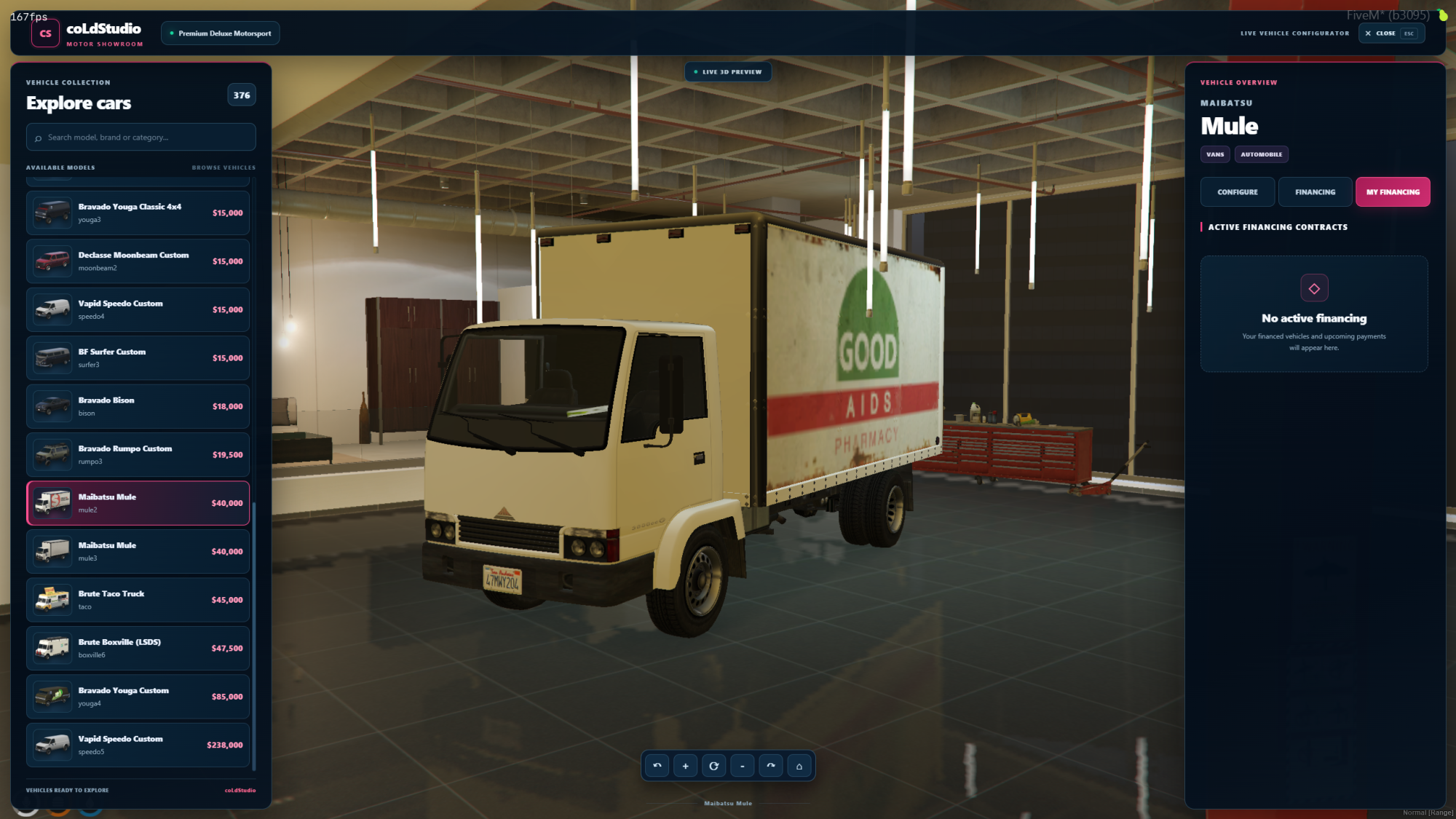
📋 My Financing Dashboard – View active vehicle financing contracts and pay remaining installments.
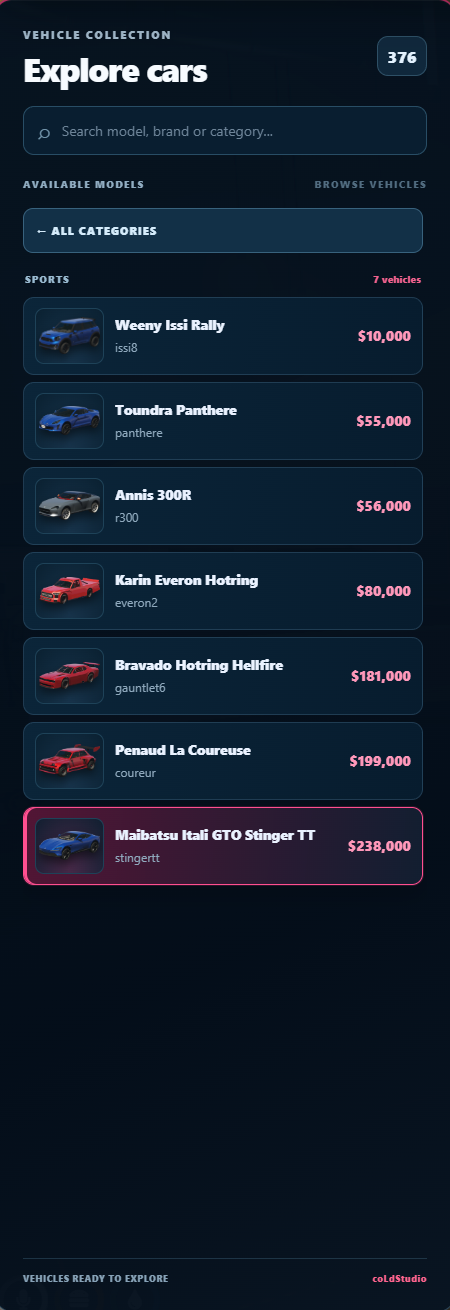
📂 Automatic Vehicle Categories – Automatically display vehicle categories based on QBCore vehicle definitions.
🔎 Vehicle Search – Quickly find vehicles in the dealership catalogue.
🖼️ Optional Vehicle Images – Support for external vanilla vehicle thumbnails and configurable custom image mappings.
📍 Configurable Dealership Locations – Customize dealership entrances, vehicle preview areas and test-drive spawn locations.
🧑💼 Optional Dealership NPCs – Enable, disable, customize and reposition dealership NPCs.
🗺️ Customizable Map Blips – Display dealership locations on the map with configurable markers.
🚙 Custom & Add-On Vehicle Support – Browse compatible vehicles registered in QBCore shared vehicle data.
🛡️ Server-Side Validation – Validate vehicle availability, pricing, purchases, financing and dealership access.
🗄️ Automatic Financing Table Setup – Verify and create the required financing database table during resource startup.
🔓 Full Source-Code Access – Editable Lua, HTML, CSS and JavaScript files.
🧩 Advanced Systems
🎥 Interactive 3D Vehicle Showroom
Give players the ability to inspect vehicles before making a purchase.
- Live vehicle previews using actual GTA V vehicle models.
- Vehicle selection directly from the dealership catalogue.
- Manual vehicle rotation.
- Automatic vehicle rotation with configurable speed.
- Camera zoom and viewing controls.
- Vehicle previews displayed in a configurable location.
- Vehicle switching without requiring players to leave the interface.
- Vehicle model information and pricing.
- Vehicle performance statistics.
The preview environment can be configured to suit your server's map and dealership setup.
🎨 Vehicle Paint Customization
Allow players to personalize their selected vehicle before purchasing.
- Primary vehicle colour customization.
- Secondary vehicle colour customization.
- Preconfigured paint colour selections.
- Optional custom HEX colour input.
- Real-time colour changes on the preview vehicle.
- Selected vehicle colours applied during the supported purchase process.
Paint customization can be enabled or disabled through config.lua.
🚗 Vehicle Browsing & Categories
Organize dealership vehicles automatically through QBCore.
- Vehicle categories generated from QBCore shared vehicle definitions.
- Category-based vehicle browsing.
- Vehicle counts per category.
- Vehicle search functionality.
- Vehicle brand and model information.
- Vehicle prices retrieved from the configured vehicle definitions.
- Support for compatible vanilla and add-on vehicles.
- Configurable category aliases.
- Dealership-specific vehicle assignments.
Adding vehicles: Register vehicles in your QBCore shared vehicle definitions and assign them to the appropriate dealership.
No separate vehicle catalogue needs to be maintained inside the NUI.
🚘 Vehicle Test Drive System
Allow customers to experience vehicles before purchasing.
- Start test drives directly from the showroom.
- Configurable test-drive vehicle spawn locations.
- Configurable test-drive duration.
- Dedicated test-drive countdown display.
- Automatic test-drive session handling.
- Server-managed test-drive vehicle creation.
- Test-drive vehicle cleanup and session management.
Test drives can be enabled or disabled through configuration.
💰 Vehicle Purchasing System
Players can purchase their selected vehicle directly through the showroom.
- Vehicle prices retrieved from QBCore shared vehicle data.
- Configurable payment account.
- Support for standard QBCore money accounts such as bank or cash.
- Server-side vehicle price validation.
- Dealership and catalogue availability validation.
- Vehicle ownership registration.
- Purchased vehicles assigned to a configured garage.
- Vehicle data stored in the standard QBCore
player_vehiclestable.
Garage Delivery: Purchased vehicles are registered as parked in the configured receiving garage, allowing retrieval through a compatible QBCore garage system.
🏦 Advanced Vehicle Financing
Offer players an alternative to paying the full vehicle price immediately.
The integrated financing system allows customers to purchase eligible vehicles using a down payment and a selected number of installments.
Financing features:
- Configurable down payment percentages.
- Configurable installment terms.
- Configurable interest percentage.
- Financing calculation before purchase.
- Down payment amount display.
- Installment amount calculation.
- Total financed amount calculation.
- Vehicle purchasing through financing.
- Dedicated Financing tab.
- Persistent financing contracts.
- Server-side financing validation.
Default financing configuration:
- Down payment options: 10%, 15%, 20%, 30%.
- Installment options: 6, 12, 18 or 24 payments.
- Default interest rate: 8%.
These values can be modified through config.lua.
Financing uses manually paid installments. Automatic scheduled payment collection, due dates and vehicle repossession are not included.
📋 My Financing – Contract Management
Players can manage existing vehicle financing contracts directly from the showroom.
- Dedicated My Financing tab.
- Active financing contract list.
- Vehicle identification for financed purchases.
- Outstanding financing information.
- Remaining installments.
- Individual installment payments.
- Updated financing balances after successful payments.
- Persistent financing records.
- Dedicated interface when no active financing contracts exist.
The financing system stores contracts in its own database table and synchronizes supported finance fields with compatible QBCore garage data where available.
🧑💼 Configurable Dealership NPCs
Add optional NPC dealers to dealership locations.
- Enable or disable NPC dealers.
- Configurable NPC models.
- Custom NPC spawn coordinates.
- Configurable NPC heading.
- Configurable NPC scenario.
- Customizable interaction prompt.
- Configurable interaction distance.
- Individual NPC settings for each dealership.
- NPC cleanup when the resource stops.
NPC dealers are optional. The showroom can also be accessed through a configured interaction point without requiring an NPC.
📍 Multiple Dealership Locations
Configure dealership locations according to your server environment.
- Multiple dealership definitions.
- Configurable dealership names.
- Custom showroom entrance coordinates.
- Independent vehicle preview locations.
- Independent test-drive spawn coordinates.
- Individual dealership NPC configuration.
- Individual dealership map markers.
- Dealership-specific vehicle availability.
Each dealership can be configured separately through config.lua.
🗺️ Configurable Map Blips
Help players locate dealerships on the GTA V map.
- Enable or disable map blips globally.
- Enable or disable blips individually.
- Custom blip names.
- Configurable blip icons.
- Configurable blip colours.
- Adjustable blip sizes.
- Short-range blip visibility settings.
- Automatic positioning based on the configured dealership entrance.
🖼️ Vehicle Image Support
The showroom supports optional vehicle catalogue images.
- Configurable external vehicle image provider.
- Vanilla vehicle thumbnail support.
- Custom image URL mappings for individual vehicle models.
- Configurable image format.
- Option to disable external vehicle images.
External vehicle images are not bundled with the resource. Image availability depends on the configured provider.
🔧 Configuration
Customize the showroom through config.lua.
Dealerships
- Dealership names and locations.
- Vehicle preview positions and camera settings.
- Test-drive positions.
- NPC configuration.
- Map blip configuration.
Vehicles
- QBCore vehicle definitions.
- Dealership assignments.
- Category aliases.
- Optional vehicle images.
- Paint customization settings.
Purchasing & Financing
- Payment account.
- Receiving garage.
- Down payment percentages.
- Installment options.
- Finance interest rate.
Interface & Preview
- Showroom branding.
- Currency symbol.
- Interaction prompts.
- Preview rotation speed.
- Performance display.
- Test-drive countdown display.
📦 Requirements
- FiveM Server
- qb-core
- oxmysql
- OneSync enabled
- QBCore vehicle definitions (
QBCore.Shared.Vehicles) - Existing QBCore
player_vehiclesdatabase table - Compatible QBCore garage resource for retrieving purchased vehicles
Framework: QBCore
ESX and Qbox are not supported by this release.
No additional paid MLO is required. Dealership entrances and preview locations must be configured for your server environment.
🗄️ Database
- Uses the existing QBCore
player_vehiclestable. - Creates the required
coldstudio_showroom_financetable if missing. - Stores persistent vehicle financing contracts.
- Verifies the financing table during startup.
- Synchronizes supported financing fields with compatible garage databases.
- Registers purchased vehicles in the configured receiving garage.
- Does not recreate or erase the existing
player_vehiclestable during normal initialization.
Database backup recommended before installation.
🔧 Installation
- Download and extract the package.
- Back up your existing dealership resource and database.
- Place
coldstudio-showroominside your server's resources directory. - Open
config.lua. - Configure dealership entrances, NPCs, blips, vehicle preview positions and test-drive locations.
- Set
Config.DeliveryGarageto the internal ID of your receiving garage. - Ensure
qb-core,oxmysqland your compatible garage resource are available. - Add
ensure coldstudio-showroomtoserver.cfg. - Restart the server or start the resource.
- Verify financing database initialization in the server console.
- Test showroom access, vehicle previews, test drives, purchases and financing.
Important: Ensure that vehicle shop assignments match the dealership IDs configured in your showroom.
Avoid running another dealership resource at the same interaction location.
🔓 Open Source – GPLv3
✔ Full client-side source code
✔ Full server-side source code
✔ Editable NUI (HTML / CSS / JavaScript)
✔ Editable configuration files
✔ GNU GPLv3 license included
✔ Source code can be modified under the GPLv3 terms
This product is not Asset Escrow protected.
The package includes GPLv3 license information and source attribution.
✅ What's Included
- coLdStudio Advanced Vehicle Showroom
- Interactive Showroom Interface
- Live 3D Vehicle Preview
- Vehicle Rotation & Camera Controls
- Vehicle Paint Customization
- Vehicle Performance Display
- Vehicle Search & Category Browsing
- Vehicle Test Drive System
- Vehicle Purchasing System
- Integrated Vehicle Financing
- My Financing Dashboard
- Configurable Dealership Locations
- Optional Dealer NPC System
- Map Blip Configuration
- Optional Vehicle Image Support
- Finance Database Setup
- Editable Configuration
- Full Source Code
- GPLv3 License & Source Notices
🛠️ Support
Framework: QBCore
Developer: coLdStudio
Discord: https://discord.gg/aSc68qzPHj
For assistance, bug reports or configuration questions, join our Discord support server.
Third-party garage compatibility depends on the installed resource and database structure. External vehicle images depend on the availability and licensing terms of the configured provider. Dealership preview locations must be suitable for your server map. Test the resource on your server before using it in production.