
 Join our Discord
🎮 coLdStudio Advanced HUD System – QBCore
A modern, fully customizable and modular HUD experience for FiveM roleplay servers.
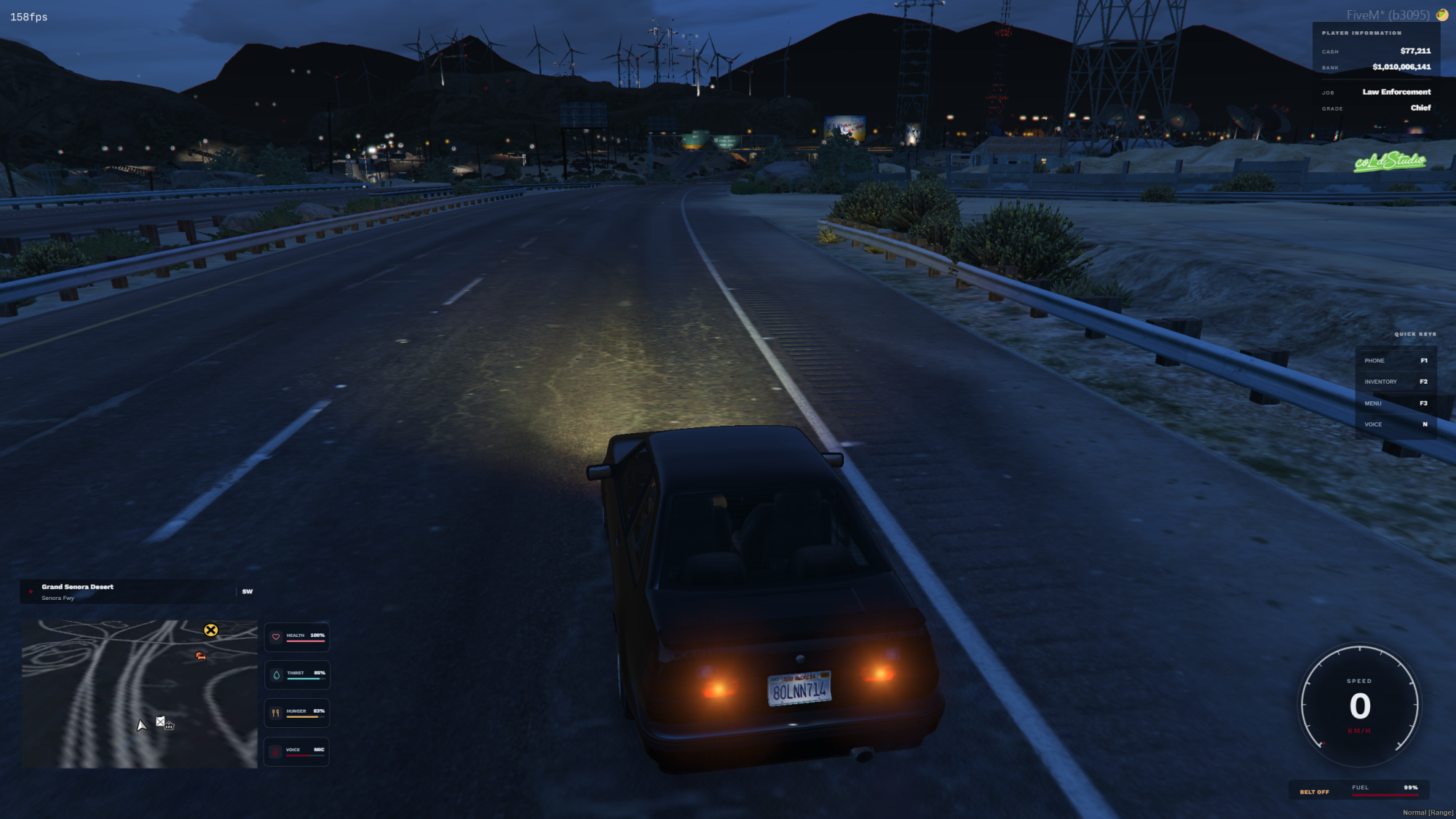
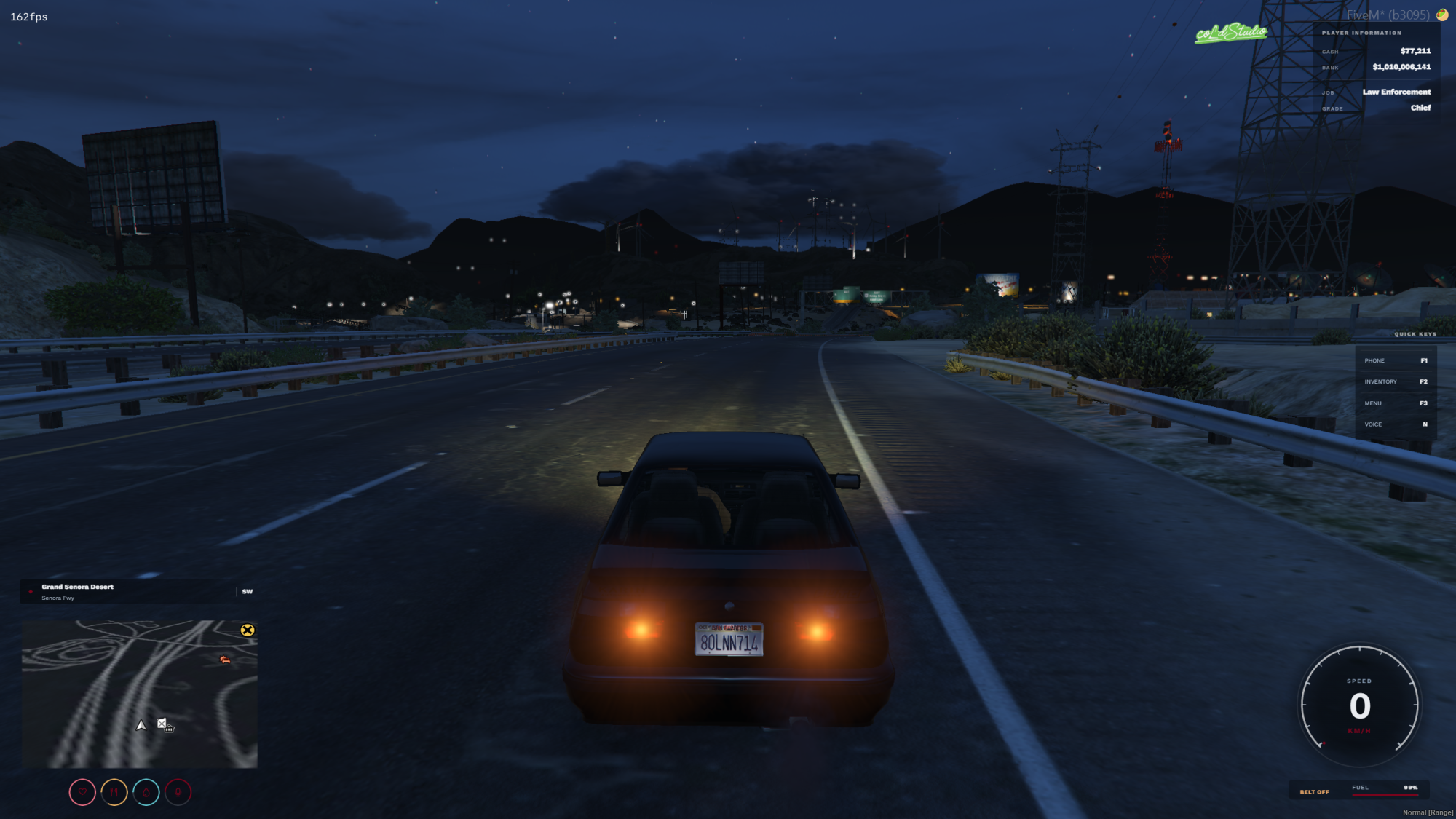
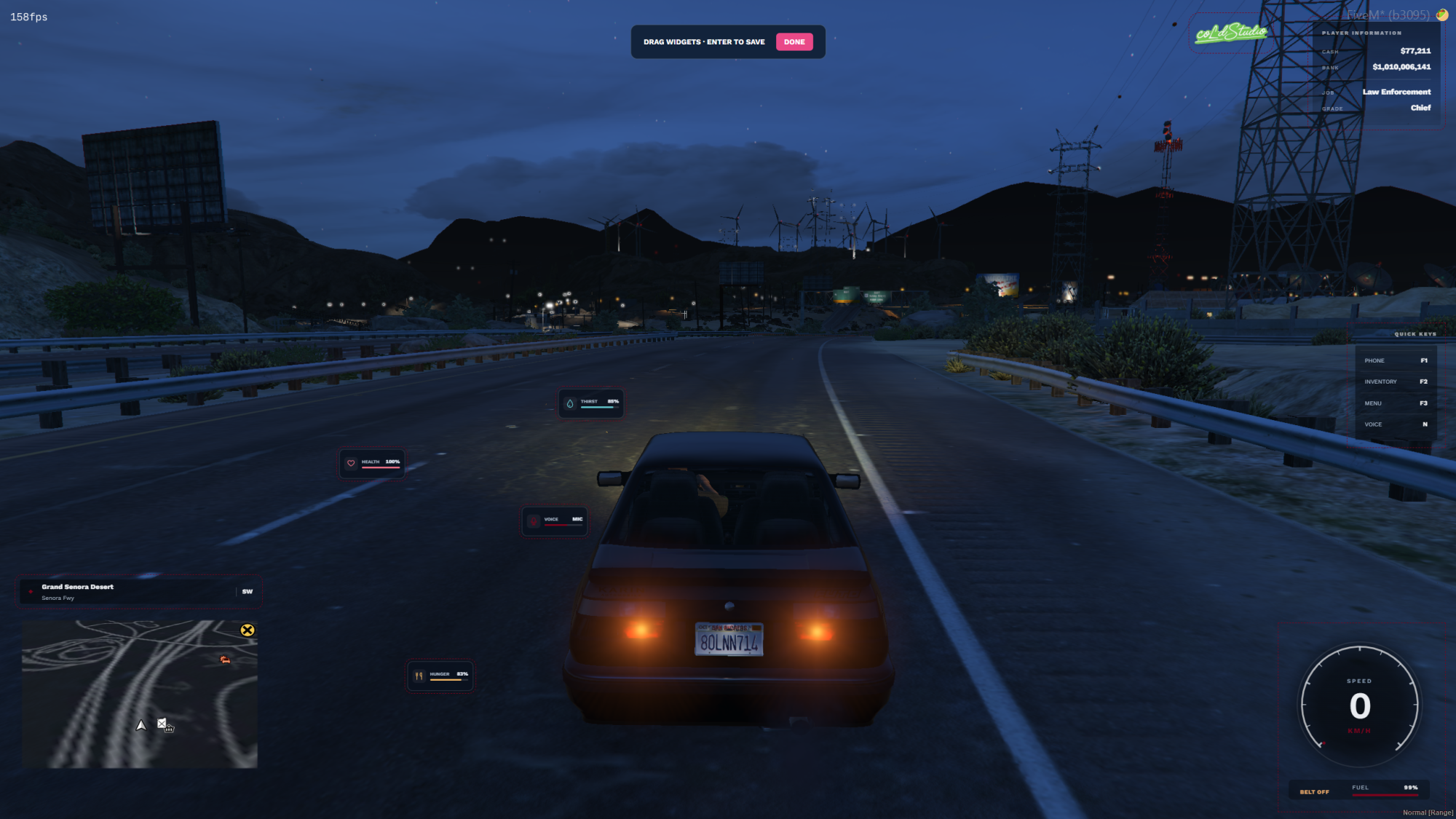
Take your server's gameplay interface to the next level with coLdStudio Advanced HUD — a customizable heads-up display featuring interactive status indicators, a circular vehicle speedometer, player information, navigation, configurable quick keys and an integrated HUD position editor.
Give players control over their interface with multiple display styles, custom accent colors, independent widget positioning, adjustable sizes, transparency settings and persistent personal preferences.
Built for QBCore, with configurable server branding, editable quick-key displays, native framework integrations and full source-code access.
🔥 Main Features
🎨 Modern Customizable HUD – Clean, transparent interface designed to display essential gameplay information without unnecessary visual clutter.
❤️ Player Status Indicators – Health, armor, hunger, thirst, stress, oxygen and voice information.
🔄 2 Status Display Styles – Switch between Minimal and Detailed status layouts.
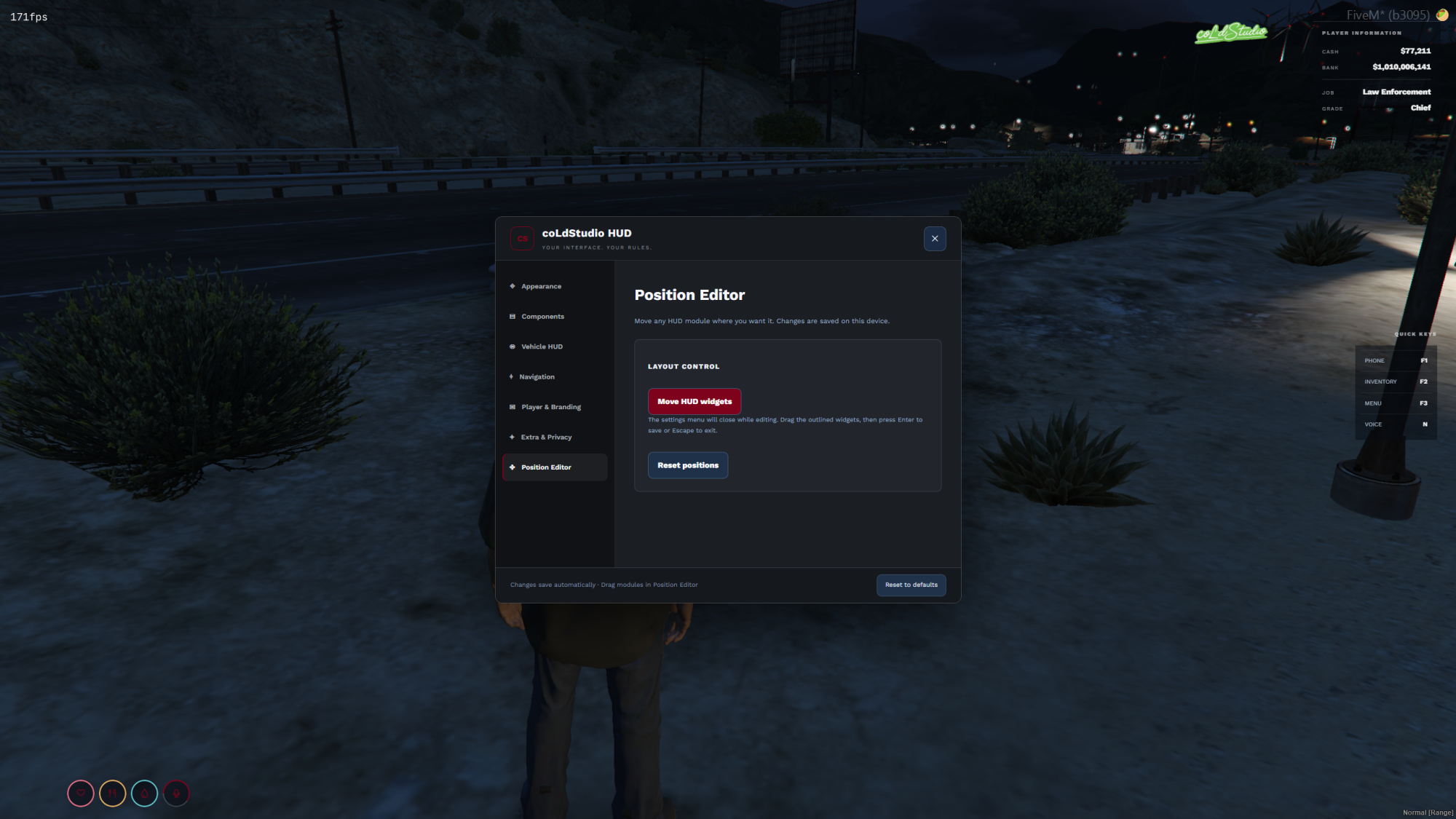
🖱️ Freeform HUD Position Editor – Drag and reposition HUD components directly in-game.
🧩 Individual Status Positioning – Move individual status indicators independently when using the Detailed layout.
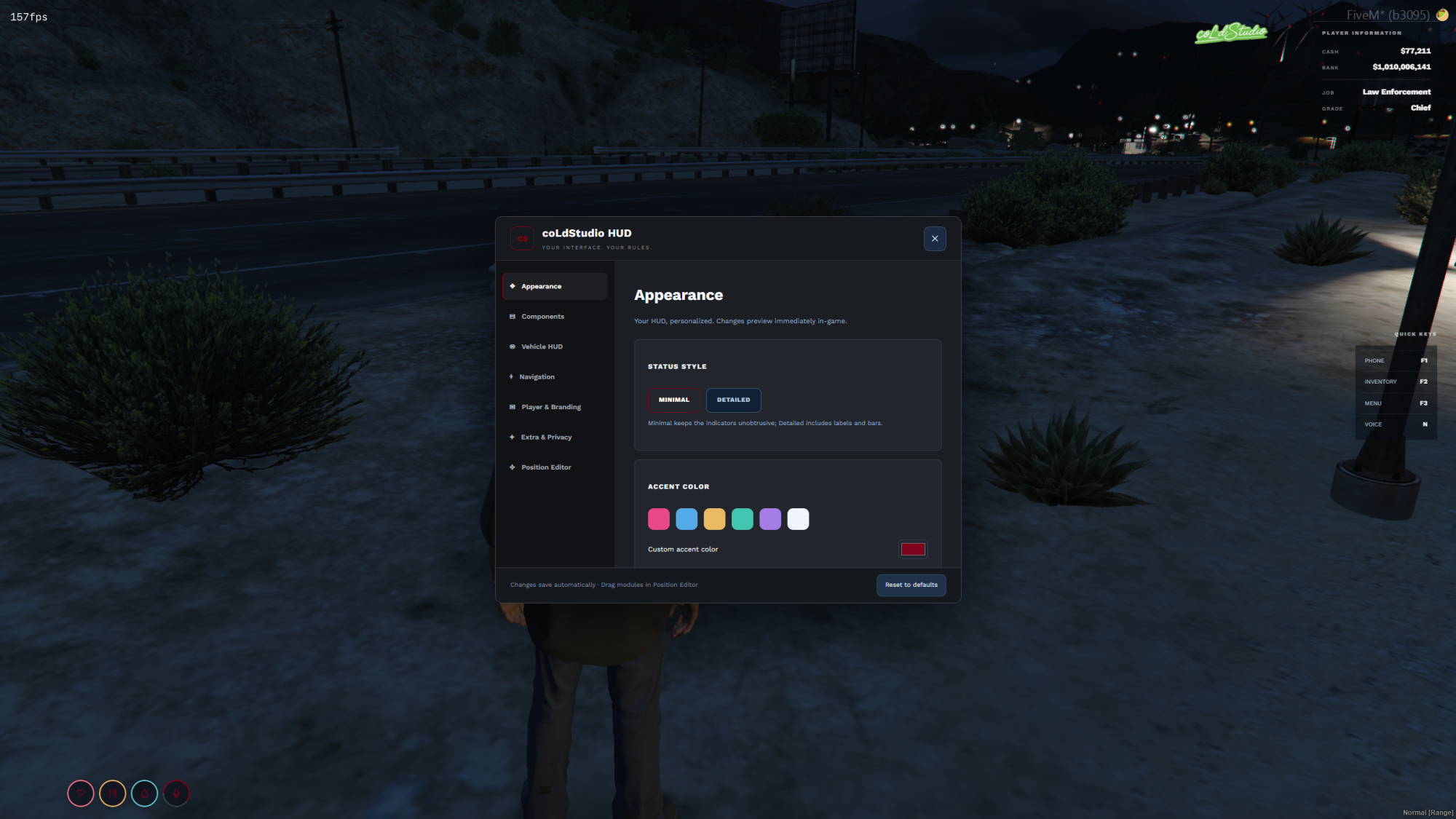
🎯 Custom Accent Colors – Choose from predefined colors or use a custom color picker.
📐 HUD Scaling & Transparency – Adjust the size and opacity of supported HUD components.
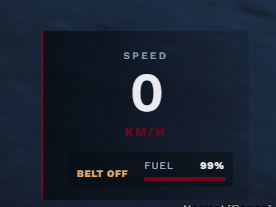
🚗 Vehicle Speedometer – Circular and digital speedometer styles.
⚡ Real-Time Speedometer Option – Choose between real-time speed updates and optimized updates.
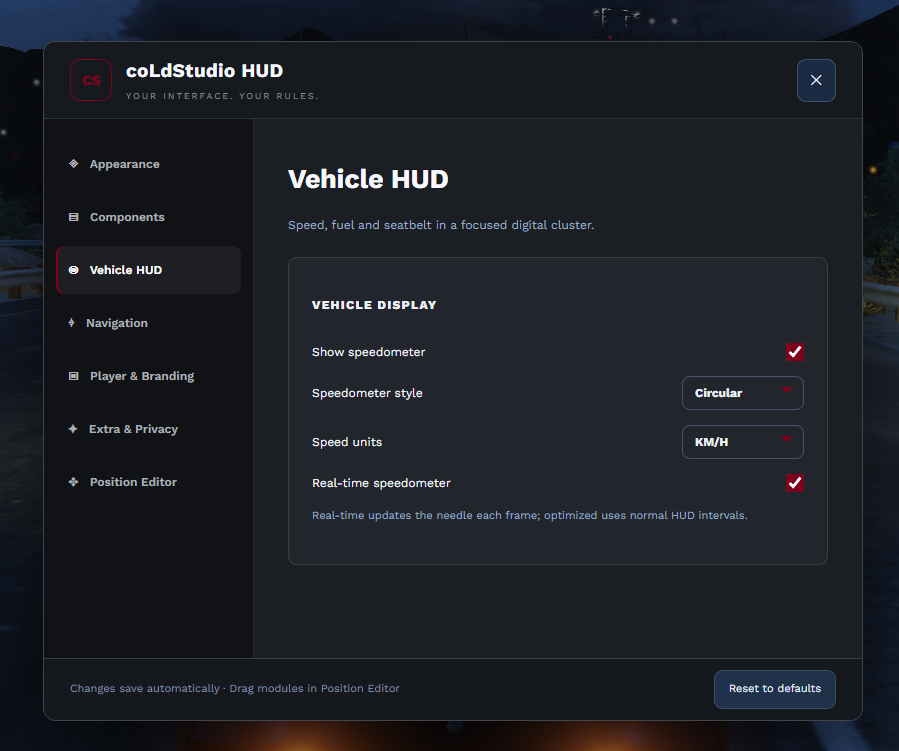
🌍 KM/H & MPH Support – Select your preferred speed measurement unit directly from the HUD menu.
⛽ Vehicle Fuel Display – View the current vehicle's fuel level.
🔒 Seatbelt Indicator – Display the current seatbelt status.
📍 Dynamic Location Display – Show your current area, street name and cardinal direction.
🗺️ Adaptive Minimap Navigation – Navigation positioning adapts when the minimap is visible or hidden.
💰 Cash & Bank Display – Display player account balances using QBCore data.
💼 Job & Grade Information – Show the player's current job and grade.
⌨️ Configurable Quick Keys – Customize displayed shortcut names and key labels through config.lua.
🏷️ Custom Server Logo – Display a configurable PNG, SVG or WEBP logo without a required background panel.
👁️ Component Visibility Controls – Enable or disable supported HUD widgets individually.
🎥 Streamer Mode – Hide money and server branding for a cleaner streaming experience.
💾 Persistent Player Preferences – Save HUD appearance, visibility and positioning preferences locally.
⚙️ Integrated /hudmenu – Configure HUD elements through a dedicated in-game settings interface.
🔓 Full Source-Code Access – Editable Lua, HTML, CSS and JavaScript.
🧩 Advanced Systems
❤️ Player Status HUD
Keep essential player information visible through a compact, customizable interface.
Supported indicators:
- Health
- Armor
- Hunger
- Thirst
- Stress
- Oxygen
- Voice activity
Status features:
- Live status information.
- SVG-based status icons.
- Percentage-based status display.
- Visual progress indicators.
- Automatic hiding of selected inactive indicators.
- Customizable accent colors.
- Adjustable HUD scale and transparency.
- Status module visibility controls.
The HUD provides two different visual layouts.
🎨 Minimal & Detailed Status Styles
Minimal Style
Designed for players who prefer a compact, unobtrusive interface.
- Compact circular indicators.
- Status icons with progress visualization.
- Minimal on-screen footprint.
- Clean layout suited for regular gameplay.
Detailed Style
Designed for players who prefer more visible information.
- Individual status modules.
- Status names.
- Percentage values.
- Progress bars.
- Independent positioning of supported indicators.
Players can switch between Minimal and Detailed directly through /hudmenu.
🖱️ Freeform HUD Position Editor
Customize the placement of HUD elements directly inside the game.
- Drag-and-drop widget positioning.
- Independent positioning of major HUD modules.
- Individual status positioning in Detailed mode.
- Move player information.
- Move navigation.
- Move the speedometer.
- Move server branding.
- Move quick-key widgets.
- Save custom widget positions.
- Restore default positions.
How it works:
- Open
/hudmenu. - Navigate to Position Editor.
- Select Move HUD Widgets.
- Drag the supported elements to your preferred positions.
- Save the layout.
Player positioning preferences are stored locally.
🚗 Advanced Vehicle Speedometer
A dedicated vehicle interface designed to provide important driving information.
Speedometer features:
- Circular speedometer layout.
- Alternative digital layout.
- Current vehicle speed.
- KM/H and MPH support.
- Vehicle fuel level.
- Seatbelt status.
- Visual speed progression.
- Configurable display visibility.
- Customizable accent color.
- Adjustable scale and transparency.
- Freeform positioning.
Speed Update Modes
Optimized Mode – Uses the standard HUD update interval.
Real-Time Mode – Uses more frequent speed sampling for a more responsive speed display while driving.
Real-Time Mode may consume more resources depending on the player's system and server configuration.
🌍 Dynamic Navigation & Location
Display contextual location information during gameplay.
- Current area or zone.
- Current street name.
- Cardinal directions.
- Automatic navigation updates.
- Adaptive positioning relative to minimap visibility.
- Individual visibility settings for location information.
- Customizable navigation position.
The navigation module can display directions such as N, NE, E, SE, S, SW, W and NW.
The interface does not require numerical compass degrees.
🗺️ Minimap Configuration
The underlying QBCore HUD includes minimap visibility and shape configuration.
- Show or hide the minimap.
- Minimap display outside vehicles.
- Square or circular minimap settings.
- Configurable minimap border settings.
- Dynamic navigation positioning.
Important: Custom minimap textures are not bundled with this release. Certain map shapes or visual replacements may require compatible external minimap assets.
💰 Player Information System
Display account balances and job information directly on the gameplay interface.
Money Display
- Cash balance.
- Bank balance.
- Live information retrieved from QBCore.
- Option to hide money information.
Job Information
- Current job name.
- Current job grade.
- Display updates using player framework data.
- Option to hide job information.
The Player Information module can also be repositioned through the HUD editor.
⌨️ Configurable Quick Keys
Provide players with a compact reference for important server shortcuts.
- Custom shortcut names.
- Custom key labels.
- Configurable widget title.
- Multiple shortcut entries.
- Optional visibility.
- Server-owner configuration through
config.lua. - Movable HUD widget.
Example configuration:
Config.QuickKeys = {
    Enabled = true,
    Title = 'QUICK KEYS',

    Items = {
        { label = 'PHONE', key = 'F1' },
        { label = 'INVENTORY', key = 'F2' },
        { label = 'MENU', key = 'F3' },
        { label = 'VOICE', key = 'N' }
    }
}
Server owners can change the displayed names and key labels to match their server.
Note: Quick Keys are informational only. Changing a displayed key label does not modify the actual FiveM key binding.
🏷️ Custom Server Branding
Personalize the HUD with your server's own identity.
- Configurable server logo.
- Support for local PNG, SVG and WEBP image files.
- Transparent logo display.
- Configurable logo filename.
- Server-owner branding controls.
- Optional logo visibility for players.
- Repositionable branding widget.
The displayed server logo is controlled through config.lua, not through a player-editable text field.
Example configuration:
Config.coLdStudioBranding = {
    Name = 'coLdStudio',
    Discord = '',
    Logo = 'coldstudio-logo.png',
    ShowLogo = true
}
The current HUD branding layout displays the logo without a required background card or Discord text.
🎨 Appearance & Color Customization
Allow players to personalize the visual identity of their HUD.
- Predefined accent colors.
- Custom HEX color selection through a color picker.
- HUD size adjustment.
- HUD transparency adjustment.
- Live visual customization.
- Status style selection.
- Persistent local appearance settings.
Players can select colors such as red, green, blue, pink, purple or their own custom accent.
👁️ HUD Visibility & Privacy
Choose which elements remain visible during gameplay.
Supported options include:
- Show or hide player status.
- Show or hide navigation.
- Show or hide the speedometer.
- Show or hide cash and bank.
- Show or hide job information.
- Show or hide server branding.
- Show or hide Quick Keys.
- Hide HUD modules.
- Enable Streamer Mode.
Streamer Mode
Hide money and server branding without needing to reconfigure the entire HUD.
⚙️ Integrated HUD Settings Menu
Open the customization interface using:
/hudmenu
Available settings sections:
Appearance
- Minimal and Detailed status styles.
- Accent colors.
- Custom color picker.
- Scale and transparency.
Components
- Status visibility.
- Navigation visibility.
- Vehicle HUD visibility.
- Quick Keys visibility.
Vehicle HUD
- Circular or digital speedometer.
- KM/H or MPH.
- Real-Time Speedometer.
- Vehicle HUD visibility.
Navigation
- Area information.
- Street names.
- Cardinal direction.
- Navigation visibility.
Player & Branding
- Cash and bank visibility.
- Job and grade visibility.
- Server logo visibility.
Extra & Privacy
- Quick Keys.
- Hide HUD.
- Streamer Mode.
Position Editor
- Drag-and-drop positioning.
- Independent widget placement.
- Restore default positions.
The settings interface allows players to see the gameplay HUD while modifying supported appearance options.
🔧 Configuration
Configure the HUD using config.lua and the integrated player settings menu.
Server Owner Settings
- Server branding and logo.
- Quick Keys labels.
- Quick Keys displayed key names.
- Quick Keys visibility.
- Default speed calculation unit.
- Default HUD behavior.
- Minimap and gameplay settings.
- Stress-related configuration.
Player Settings
- Status display style.
- Accent color.
- Custom color selection.
- HUD scale.
- HUD transparency.
- Speedometer style.
- Speed units.
- Speedometer update mode.
- Widget visibility.
- Individual widget positioning.
- Streamer Mode.
- Default layout restoration.
Server configuration and player appearance preferences are handled separately.
💾 Player Settings & Persistence
- Personal HUD configuration.
- Saved appearance preferences.
- Saved HUD module positions.
- Saved visibility settings.
- Saved speedometer preferences.
- Local browser-based NUI storage.
- Default appearance and position restoration.
Note: Player HUD settings are stored locally in the FiveM NUI environment. They are not synchronized across different computers through an SQL database.
📦 Requirements
- FiveM Server
- qb-core
- Compatible QBCore player metadata
- Compatible voice resource for voice-related information
Framework: QBCore
ESX and Qbox compatibility are not included in this release.
The HUD uses GTA V/FiveM interface components and QBCore player information.
Third-party integration behavior depends on the installed server resources and their APIs.
🗄️ Database
- No dedicated SQL database is required for HUD appearance settings.
- Player information is retrieved from QBCore.
- HUD preferences are saved locally in NUI storage.
- Existing framework data is used for player statistics and account information.
No separate HUD SQL import is required.
🔧 Installation
- Download and extract the package.
- Back up your existing
qb-hudresource and player settings. - Place the included
qb-hudfolder inside your server's resources directory. - Open
config.lua. - Configure your server logo and Quick Keys.
- Ensure
qb-coreand the required supporting resources are running. - Add
ensure qb-hudtoserver.cfg. - Restart the server or resource.
- Enter the game and use
/hudmenu. - Verify player status, vehicle speedometer, navigation and personal settings.
- Test the HUD editor and saved positions.
Important: Do not run another HUD resource simultaneously unless it has been configured to avoid overlapping interface elements.
The package does not include separately supplied custom minimap texture packs.
🔓 Open Source – GPLv3
✔ Full client-side source code
✔ Full server-side source code
✔ Editable NUI (HTML / CSS / JavaScript)
✔ Editable config.lua
✔ Editable locale files
✔ GNU GPLv3 license included
✔ Source code can be modified under the applicable license terms
This product is not Asset Escrow protected.
✅ What's Included
- coLdStudio Advanced HUD System
- Customizable Player HUD
- Minimal Status Layout
- Detailed Status Layout
- Individual Status Positioning
- Freeform Position Editor
- Circular Vehicle Speedometer
- Digital Speedometer
- KM/H & MPH Settings
- Real-Time Speedometer Option
- Fuel & Seatbelt Indicators
- Dynamic Navigation
- Cash & Bank Display
- Job & Grade Display
- Configurable Quick Keys
- Custom Server Logo Support
- Appearance & Color Settings
- Streamer Mode
- Local Preference Storage
- Configurable Gameplay HUD Settings
- Editable Lua Source Code
- Editable NUI Source Code
- Configuration Files
- Locale Files
- Installation Instructions
- GPLv3 License
🛠️ Support
Framework: QBCore
Developer: coLdStudio
Discord: https://discord.gg/aSc68qzPHj
For assistance, bug reports, installation questions or configuration support, join our Discord community.
The HUD is designed for QBCore-based FiveM servers. Compatibility with third-party scripts, voice integrations and custom minimap resources may vary. Custom minimap texture packs are not included. Real-Time Speedometer mode may affect performance depending on hardware and server conditions. Please test the resource and its dependencies before using it in production.